
Camera & pool calibration
Configure pool profiles, lane numbering, start side, Live Action water effects, and 4-corner perspective calibration.
Align LaneCue's 3D perspective lane overlays to your pool camera so swimmer names and times sit cleanly inside each lane on the water.
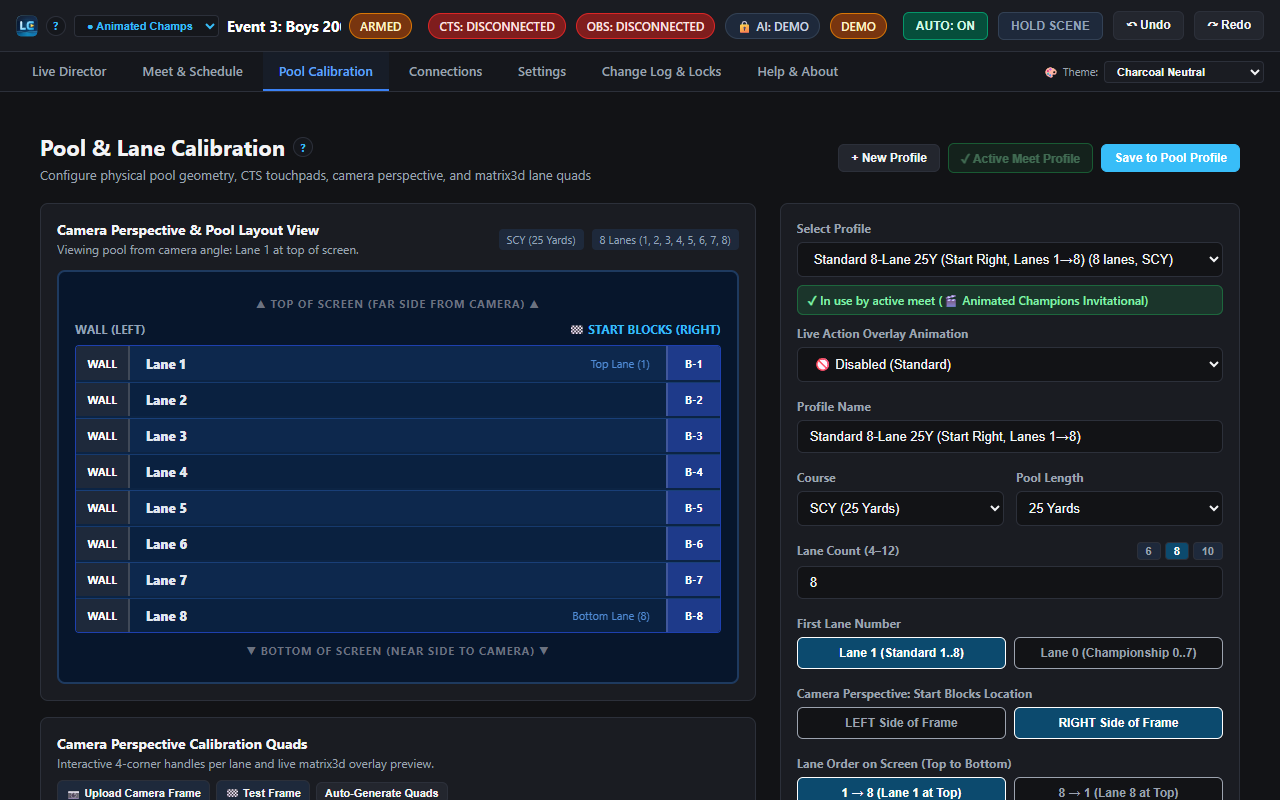
Pool profile settings #
Open the Pool Calibration tab to configure or select a pool profile:
- Lane count:
1to12lanes. - Lane numbering: Standard
1..Nor reversedN..1depending on which side of the pool your camera faces. - Start side (
LEFTorRIGHT): Tells LaneCue which side of the frame has the starting blocks. This automatically docks the compact Scoreboard overlay on the opposite side (D59) and truncates Finish Lane banners before the swimmer reaches the wall (D56). - Live Action water effects: Optional subtle animated background styles (
none,sun-caustics,rippling-waves,refracted-light,neon-pulse) confined behind crisp foreground text.
4-corner perspective calibration #
- Upload or capture a still test frame from your pool overview / start camera (at 1920×1080).
- Drag the four corner handles on the calibration canvas to match the water surface rectangle of your competition lanes (from lane 1 far wall to lane N near wall).
- Fine-tune individual corners with the Corner Tuning controls and click Save Profile.
LaneCue computes a 3D CSS matrix3d homography with 2× supersampling (840×128) so lane text remains sharp on 1080p and 4K broadcasts.
Camera placement tips #
- Elevated side-angle: Mount the camera as high as practical (balcony or press box) looking diagonally across the lanes. Higher angles separate lanes cleanly.
- Lock the tripod: Any camera pan or zoom after calibration will shift the lane overlays out of alignment.
- Avoid direct glare: Polarizing filters or slight angle adjustments help keep lane cards readable over bright natatorium reflections.